Project 9
Entra ID as Code: Terraform + Drift Detection
Architecture
Overview
What was built
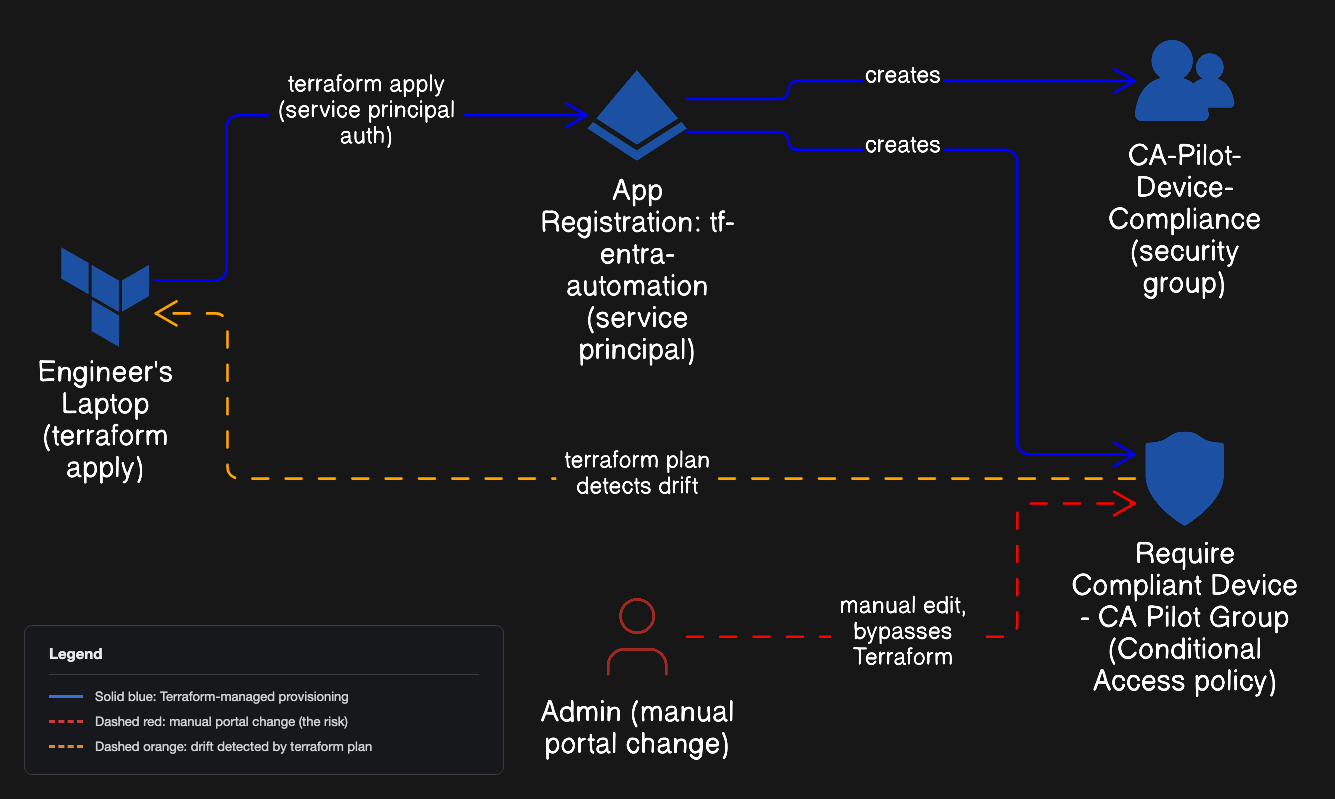
Every prior project in this portfolio was built by hand, clicking through the Entra admin center. Used Terraform instead to manage a real Entra ID security group and a Conditional Access policy as code, authenticating as a dedicated service principal with least-privilege Microsoft Graph permissions rather than my own Global Admin account. The policy was deployed in report-only mode first, validated against a real sign-in, then switched to enforced. It was never turned on blind.
To prove the actual point of infrastructure as code, I then manually disabled the policy directly in the portal to simulate an unauthorized change, the exact failure mode IaC exists to catch. terraform plan caught the drift immediately, and terraform apply reversed it, confirmed by Terraform's own live read against the Graph API rather than a portal screenshot that could be stale.
Why
Why it matters
Whether a Conditional Access policy is configured correctly isn't the real question. The real question is whether it still matches what's documented, and whether I'd find out if someone changed it by hand without telling anyone. A portal screenshot can't answer that. Code that's the declared source of truth, checked against the live tenant on demand, can.
The narrow skill this project proves is drift detection and reconciliation, the actual core of what infrastructure as code is for, not just wiring a tool into a lab as a surface-level integration. It's scoped deliberately small: local state, no remote backend, no CI/CD, no modules. That's a real limitation in a team setting, not something I'm pretending is already solved, and it's the honest next step rather than a gap to hide.
How it works
The walkthrough
Step 1 of 9
Register the automation identity
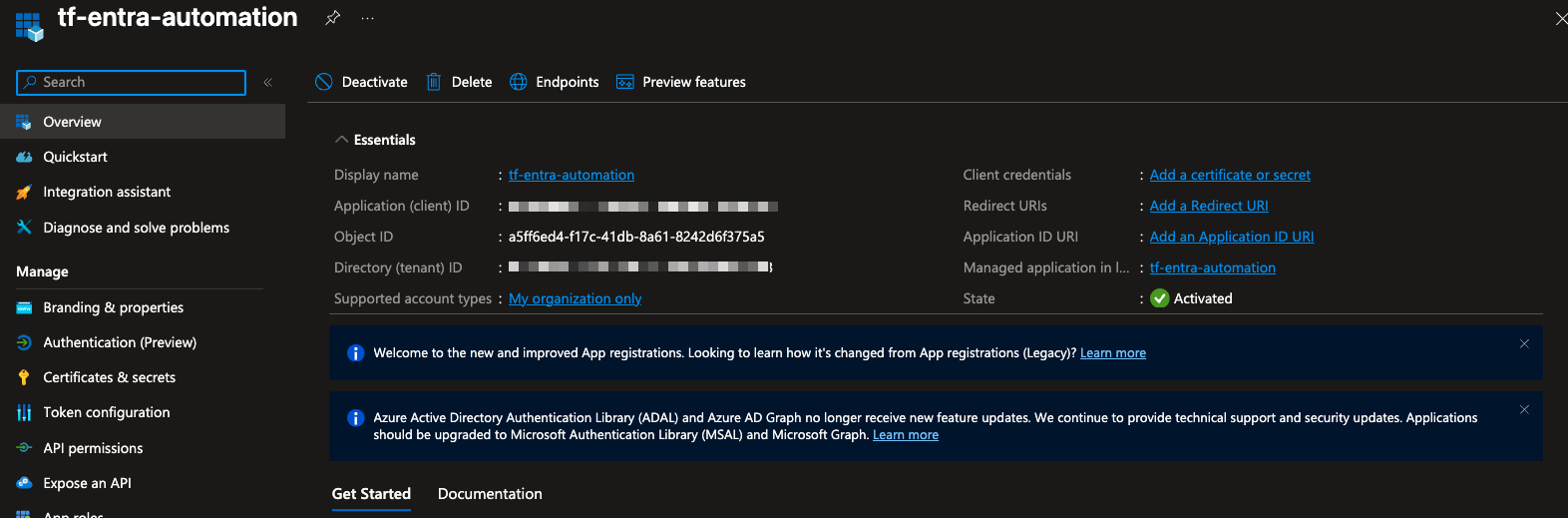
Registered an app registration, tf-entra-automation, as the identity Terraform authenticates with over the Graph API. Least privilege applies to the automation itself, not just to human users: this app can touch groups and Conditional Access policies and nothing else, and it never logs into the portal.
Step 2 of 9
Fix a real credential mixup before the real build
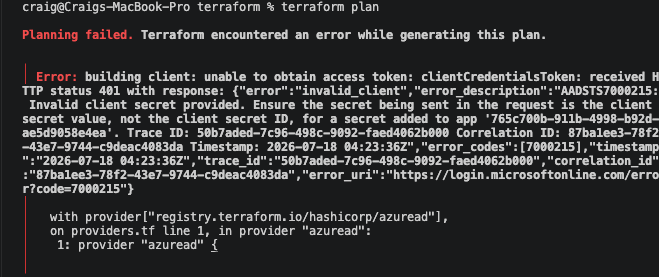
The first terraform plan failed with AADSTS7000215. I'd pasted the app registration's client secret Secret ID into terraform.tfvars instead of the secret's actual Value, two strings that look equally plausible at a glance. Microsoft's error text spelled out the exact distinction, which made it a fast fix once read carefully.
Step 3 of 9
Grant least-privilege Graph permissions, one real 403 at a time
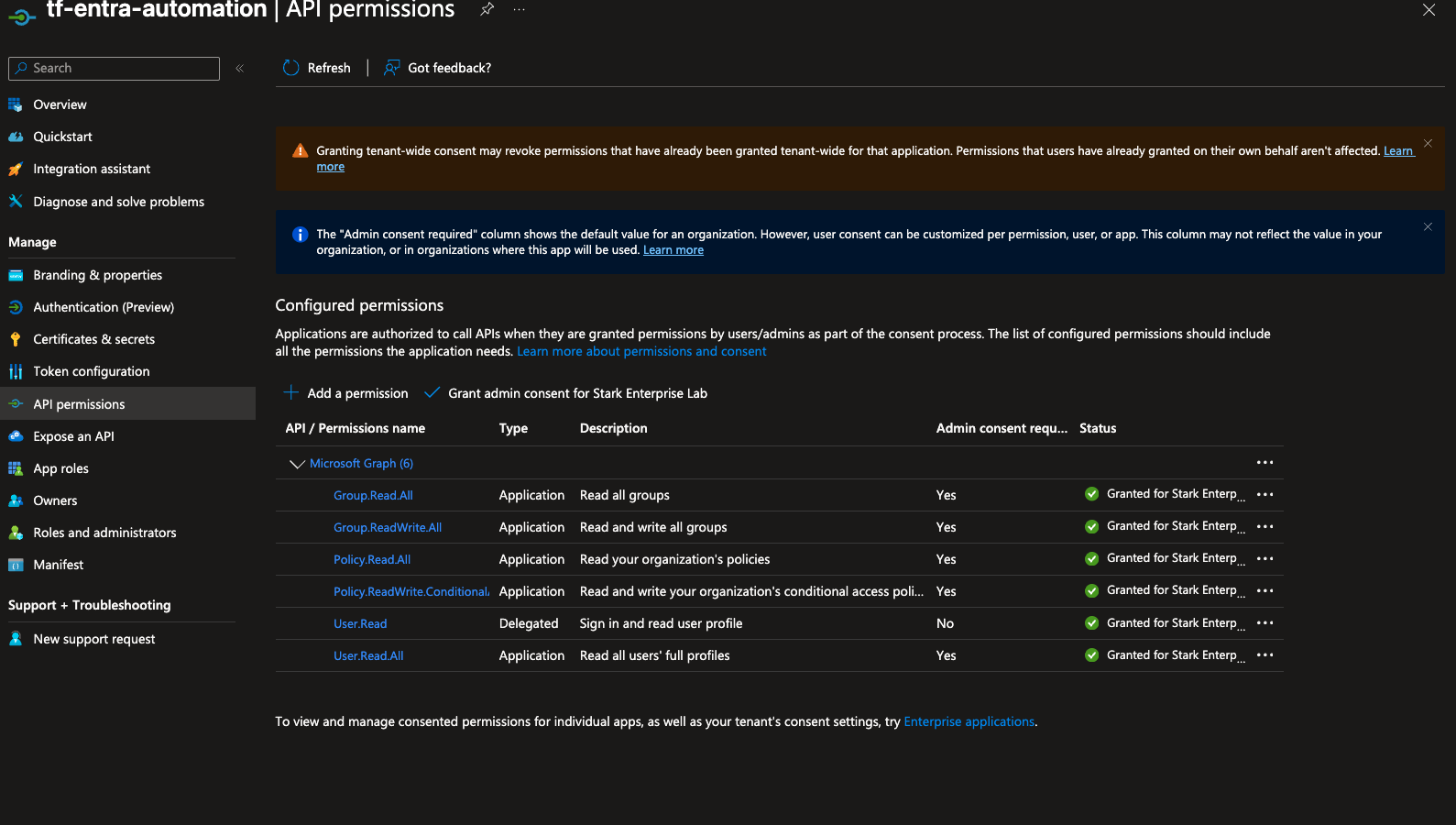
The first terraform apply hit three separate permission errors in sequence: a missing User.Read.All for the user lookup, Group.Read.All being insufficient for creating a group (Group.ReadWrite.All was needed), and a genuinely obscure known issue where creating a Conditional Access policy via app-only auth needs Policy.Read.All granted alongside Policy.ReadWrite.ConditionalAccess, something the permission's own name gives no hint of. Fixed each the same way: read the error, add the permission, grant consent, rerun.
Step 4 of 9
Deploy in report-only mode first
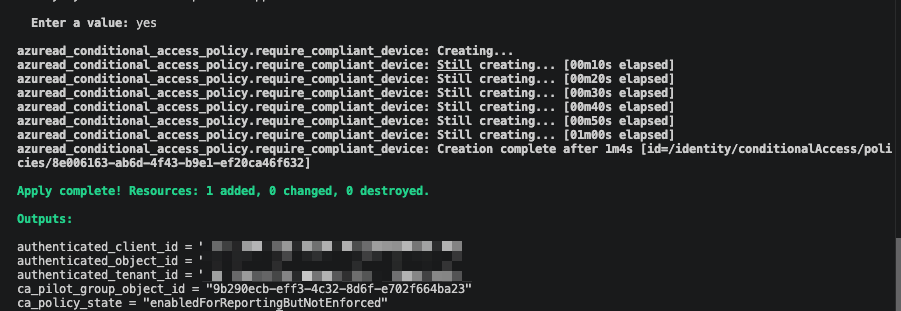
terraform apply created the pilot group, scoped to one member, and the Conditional Access policy in enabledForReportingButNotEnforced state. Never enforced blind, same discipline as any real Conditional Access rollout.
Step 5 of 9
Validate against a real sign-in
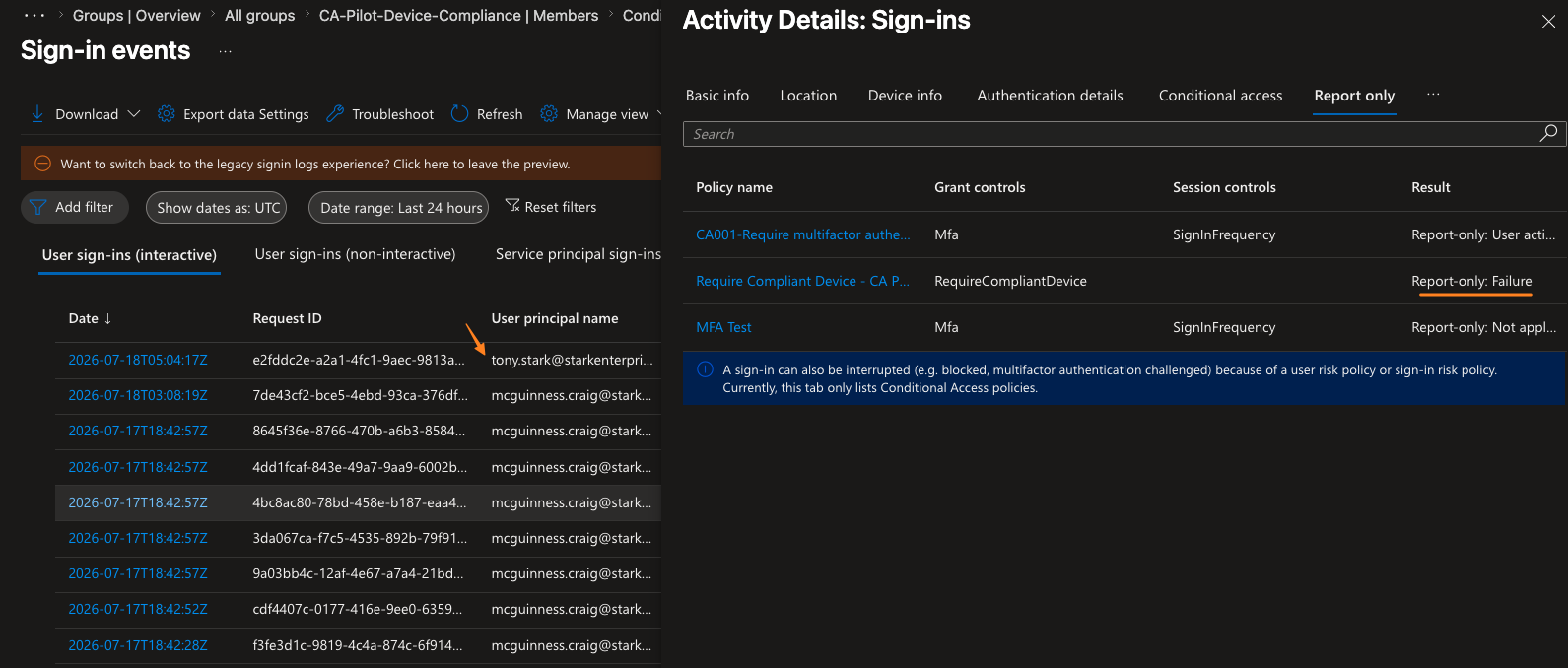
Signed in as the pilot user from an unmanaged macOS device. The sign-in log's report-only tab confirmed the policy correctly evaluated the device as non-compliant without blocking anyone, proof the policy behaves correctly before it can affect a single real user.
Step 6 of 9
Flip to enforced and hit a break that didn't match the plan
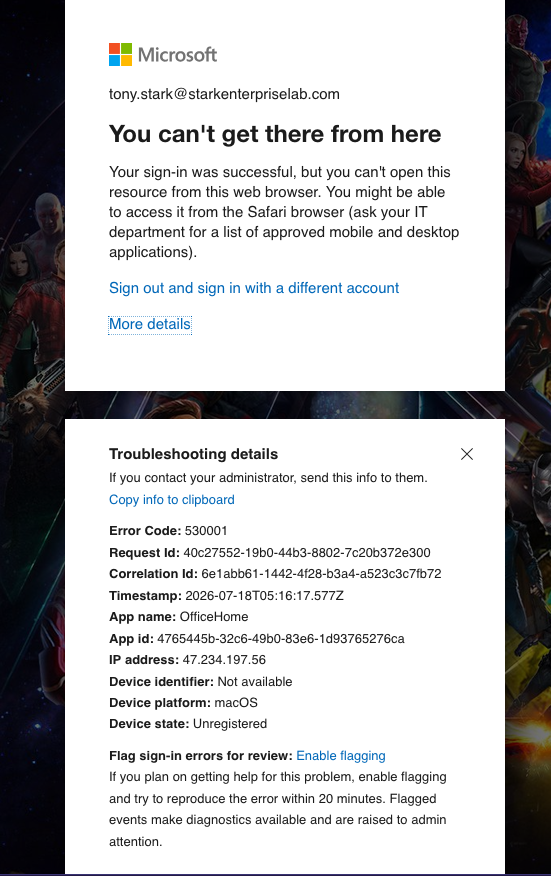
Changed one field, state = "enabled", and reapplied. The first real sign-in after that didn't produce a clean compliance error. It produced error 530001, "You can't get there from here," telling the user to switch to Safari, Entra's browser and WAM compatibility gate, which doesn't mention compliance at all. Only a second sign-in, from a browser capable of completing the native device-auth handshake, surfaced the real compliance failure: ResultType 50097, isCompliant: false.
Step 7 of 9
Confirm both failure modes in the log
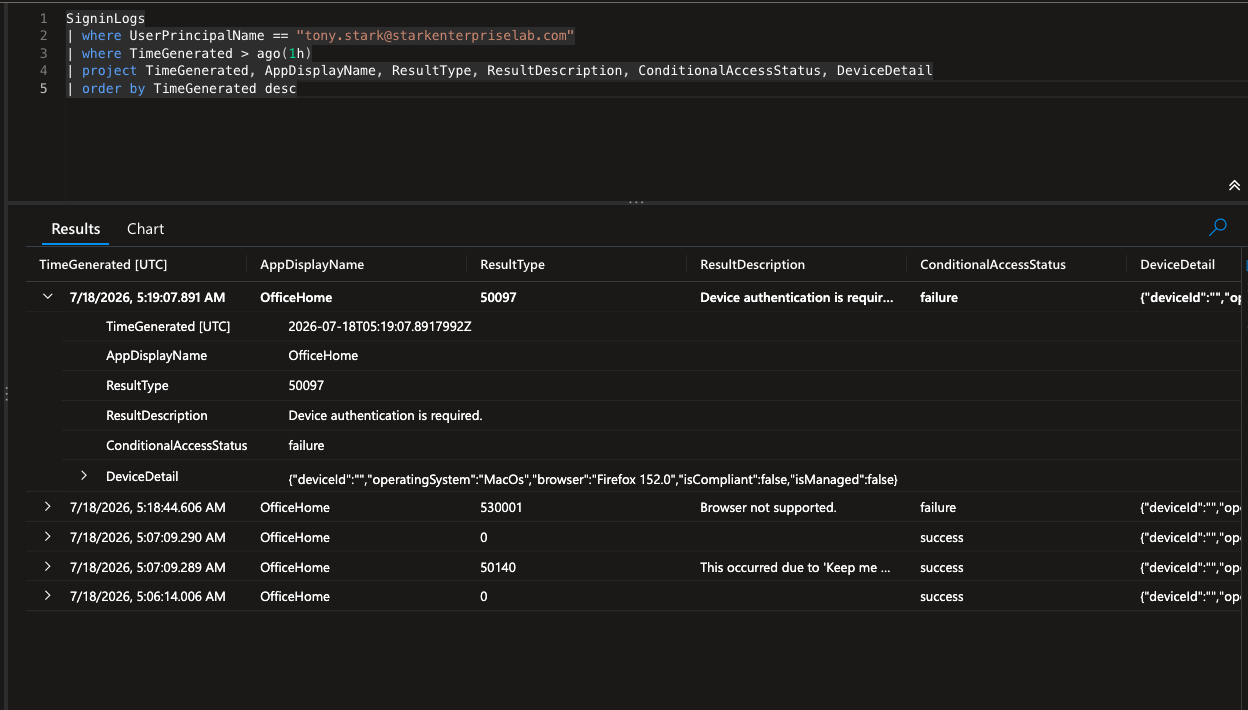
Queried SigninLogs directly and found both real entries: 530001 ("Browser not supported") and 50097 ("Device authentication is required"), with DeviceDetail showing isCompliant: false and isManaged: false, the device having never been enrolled in an MDM.
Step 8 of 9
Simulate drift and watch Terraform catch it
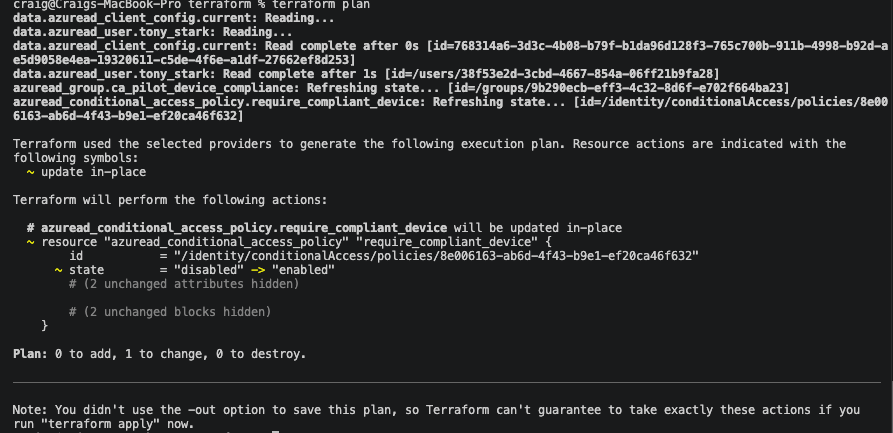
Manually disabled the Conditional Access policy directly in the portal, simulating exactly the failure mode infrastructure as code exists to catch: an undocumented change made outside the pipeline. terraform plan caught it immediately, showing state = "disabled" -> "enabled" as a required change.
Step 9 of 9
Restore and confirm
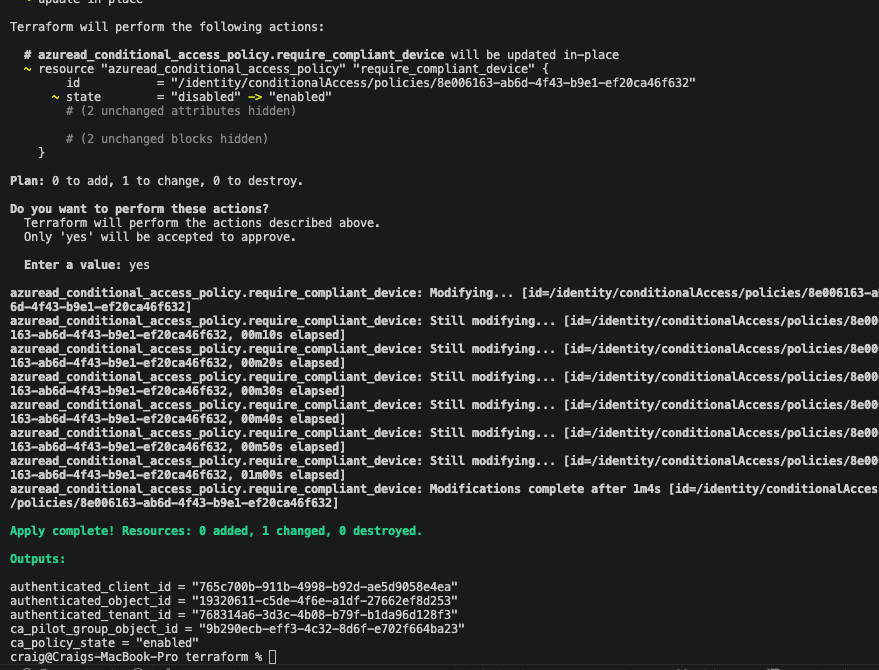
terraform apply reversed the drift. The proof is Terraform's own live read against the Graph API in the same apply run, ca_policy_state = "enabled", arguably more authoritative than a portal screenshot that could be stale or cached.
What went wrong
Honest account
The plan was one clean break: flip the policy to enforced, get one clear compliance error. What happened instead was two distinct real errors in sequence. The first, error 530001, isn't a compliance message at all, it's a browser and WAM (Web Account Manager) compatibility gate that tells the user to switch browsers and never mentions compliance. Only a second sign-in, from a browser capable of completing the native device-authentication handshake, produced the actual compliance failure, ResultType 50097 with isCompliant: false.
That ordering matters for a real support scenario. A helpdesk unfamiliar with the distinction could easily misdiagnose 530001 as a browser-support ticket and never realize the underlying requirement is device compliance at all.
Before any of that, the very first real error had nothing to do with Conditional Access: AADSTS7000215, from pasting the app registration's client secret ID into terraform.tfvars instead of its actual value. Two strings that look equally plausible at a glance, which is exactly why Microsoft labels them separately.
What I learned
Takeaways
A device being Entra-joined or Entra-registered does not make it compliant. Compliance is a separate flag that only an MDM sets, by enrolling the device and evaluating it against a policy, and a device that's never been evaluated by an MDM will always fail a "require compliant device" grant control regardless of join state.
This lab uses local Terraform state and a locally stored client secret with no remote backend, no CI/CD, and no PR review gate. That's a real control gap in a team setting, and I'd rather name it upfront than have someone else point it out. Remote state, a CI-triggered plan and apply, and secrets in a vault are the explicit next steps, not something I'm pretending is already built here.